Instant CEFR Feedback on Any Handwritten ESL Writing
Score any ESL writing with AI grading against IELTS, TOEFL, Cambridge IGCSE, PTE, and more — in 90 seconds
5 free scans · No card needed · Failed scans don't count
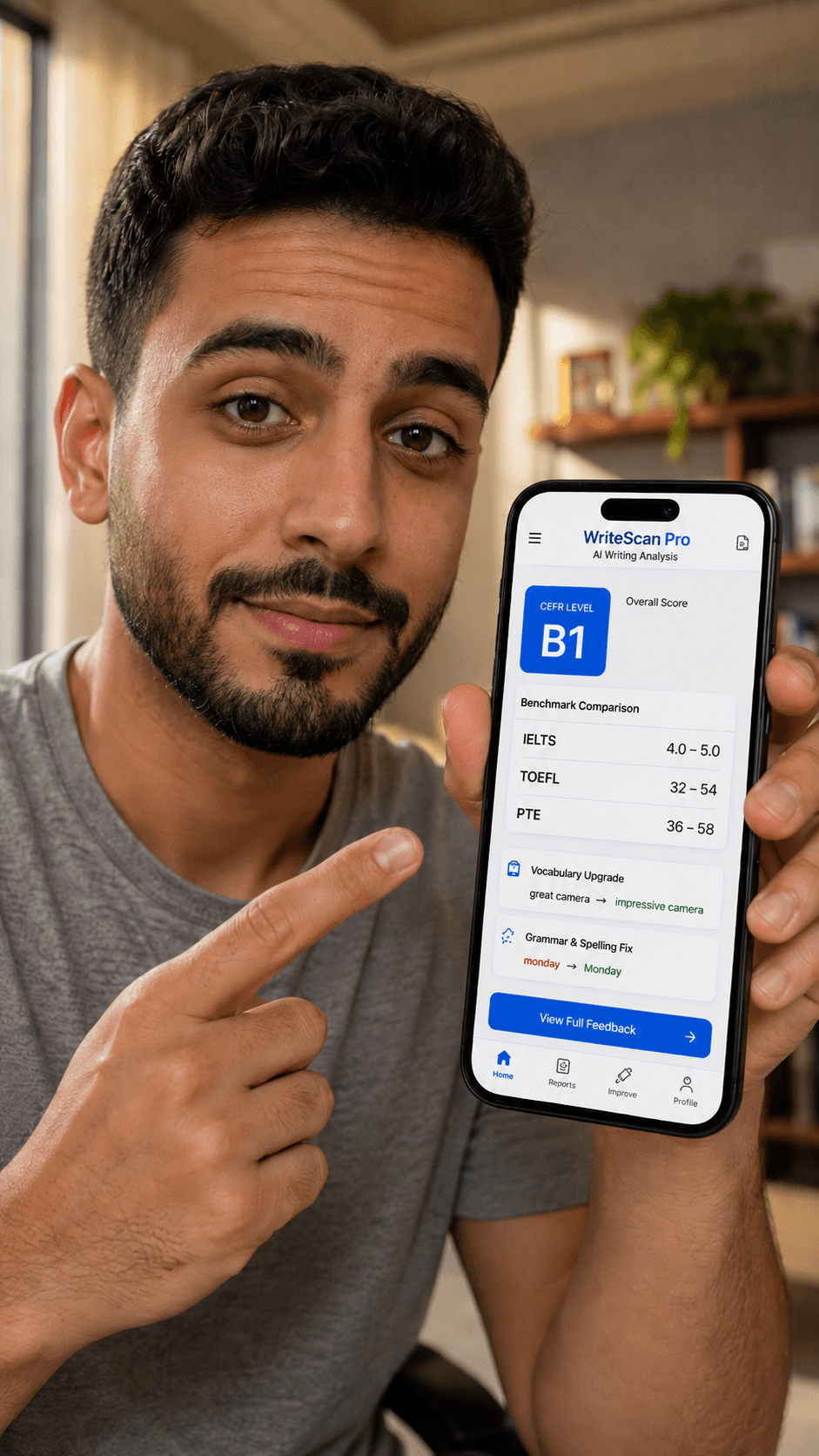
Used by teachers in Saudi Arabia and South Africa
99.2% extraction accuracy
CEFR A1–C2 grading
Arabic + English feedback
Everything a marking pile needs
Failed scans don't count — if something goes wrong, you don't lose a free scan.
Phone Camera Scan
Point your camera at any handwritten work. Printed, handwritten, or messy — AI reads it all.
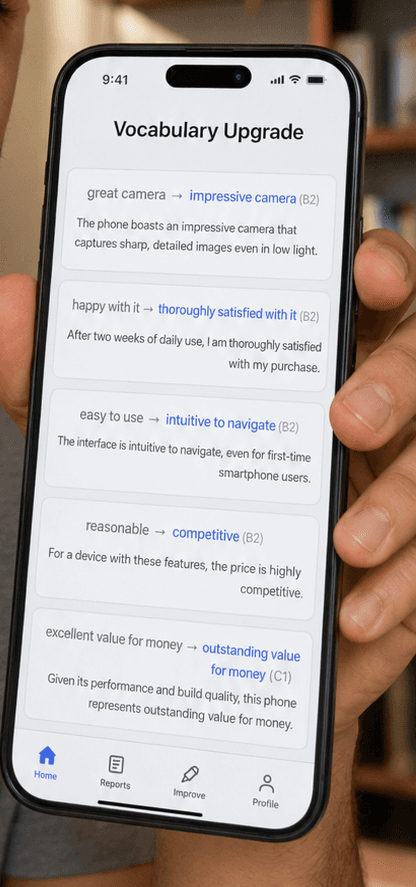
CEFR Grading with Justification
Every grade explained with direct quotes from the student's own writing as evidence.
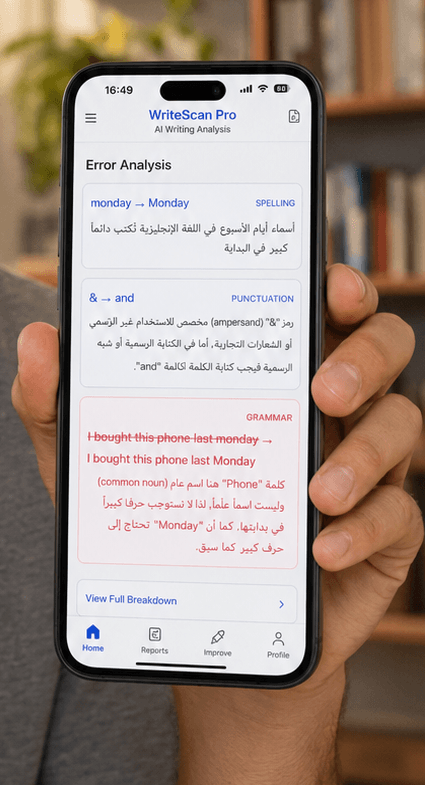
Arabic + English Feedback
Full feedback written natively in Arabic. Not translated — written by AI as an Arabic teacher would.
Custom Rubrics
Upload your school's rubric or customise the default CEFR criteria and weights.
Student Progress Tracking
See every student's CEFR journey over time. Class overview and individual progression charts.
Google Drive + Sheets + API
Grades push automatically to your Google Sheets gradebook. PDF saves to Drive. API for school systems.
This is what your teachers get in 90 seconds
How to get started
No credit card. No complicated setup. Just WhatsApp us and you are scanning in minutes.
Message us on WhatsApp
Tell us which plan you need
Receive payment details
Pay via bank transfer, STCPay, or PayFast
Get your license key
A unique key sent to you personally
Start grading immediately
Enter your key and scan your first essay — grading happens automatically
Simple, per-school pricing
WhatsApp us to get access — no credit card required.
We'll email you when you're running low on free scans, so you're never surprised.
Student
$5/mo
- ✓20 scans/month
- ✓PDF export
- ✓Arabic + English feedback
- ✓Email support
Pay via bank transfer · STCPay · PayFast
Request Access on WhatsAppNo credit card needed · Pay locally
Teacher
$19/mo
- ✓100 scans/month
- ✓PDF export
- ✓Google Drive + Sheets
- ✓Custom rubrics
- ✓Bilingual reports
- ✓Priority support
Pay via bank transfer · STCPay · PayFast
Request Access on WhatsAppNo credit card needed · Pay locally
School
$150/mo
- ✓Unlimited scans
- ✓Multi-teacher accounts (seat management)
- ✓Student records & progress tracking
- ✓Usage dashboard (per-teacher activity)
- ✓API access
- ✓Custom rubrics — unlimited manual + AI-powered upload
- ✓White-label branding*
- ✓Dedicated onboarding
- ✓Priority support
*Logo & color upload live now — full report/app theming coming soon.
Pay via bank transfer · STCPay · PayFast
Request Access on WhatsAppNo credit card needed · Pay locally
All plans start with 5 free scans — no card needed.
See WriteScan Pro in Action
Watch how a handwritten essay becomes an instant CEFR-graded report in under 30 seconds.
Frequently asked questions
Does it work with messy handwriting?+
Yes. The AI vision model reads handwriting and grades the English underneath it, trained across skill levels and pen pressures, from neat cursive to rushed exam scrawl. If a word is genuinely illegible it's flagged in the report rather than guessed at, so you always know what to double-check.
What languages does the feedback support?+
Every report can be generated in Arabic, English, or both side by side on the same page. The Arabic feedback isn't a machine translation of the English — it's written natively, the way an Arabic-speaking teacher would phrase it. Most ESL grading tools are English-only and require typed text; WriteScan Pro is built to read handwriting directly and grade it in either language.
Can I use my school's own rubric?+
Yes, on the School plan. Upload your school's existing rubric or start from the built-in CEFR criteria and adjust the weighting per criterion — every grade the AI gives is checked against whichever rubric is active.
How does CEFR grading work?+
Each essay is scored across five criteria out of 20 points each (100 total), then mapped to a CEFR band from A1 to C2 using fixed grade boundaries. Every score comes with a written justification quoting the student's own sentences as evidence.
Does it work on a phone or tablet?+
Yes — scanning is built for a phone camera first. Open WriteScan Pro in your mobile browser, photograph the page, and the report generates in under two minutes. No app install or scanner hardware needed.
Is student data stored securely?+
Yes. Submissions and reports are stored per-school behind authenticated accounts, encrypted in transit, and never used to train external models. The School plan adds a dedicated onboarding call to walk through your school's specific data-handling requirements.